
Qwen Vision (Qwen3-VL)
Qwen3-VL is the most complete open-source vision-language family you can get right now. Six model sizes, from a 2B model that runs on a phone to a 235B MoE flagship that trades blows with GPT-5 on math-heavy visual tasks. Every single size ships in both Instruct and Thinking variants. All Apache 2.0.
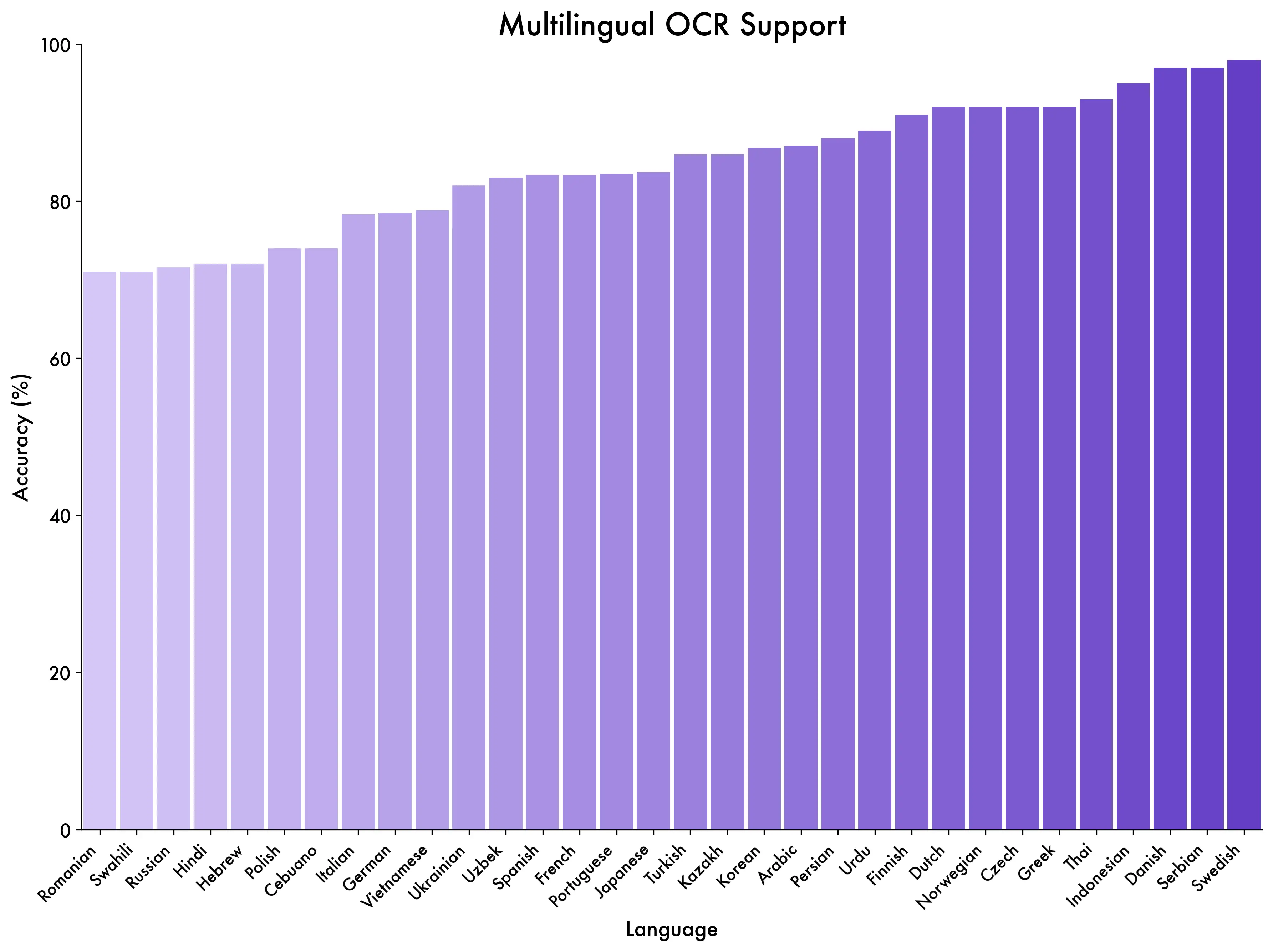
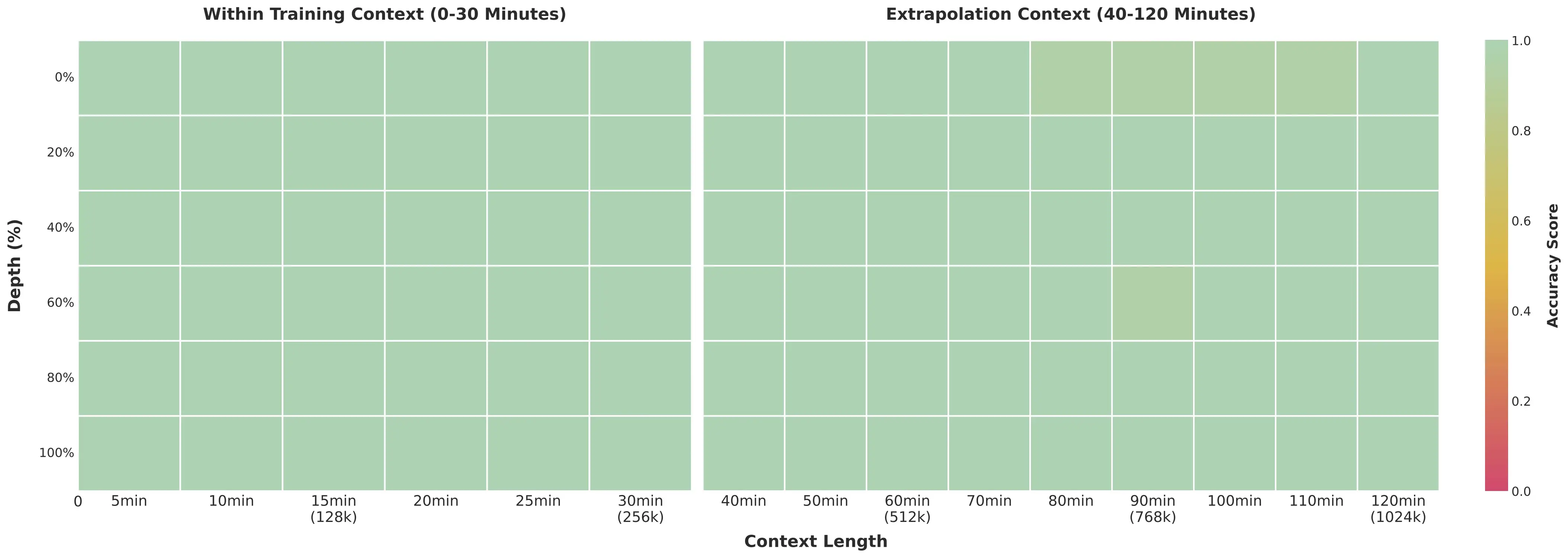
What makes this lineup genuinely different from previous generations: native 256K context (expandable to 1M), 2-hour video understanding with second-level timestamps, OCR across 32 languages, and a Thinking mode that shows its reasoning step by step before answering. The MoE variants (30B-A3B and 235B-A22B) activate only a fraction of their total parameters per token, so you get big-model quality at small-model inference cost.
Navigate this guide:
- All 6 Models at a Glance
- Which Model Should You Pick?
- Thinking vs Instruct — When Each Wins
- Benchmarks That Matter
- Capabilities Showcase
- Qwen3-VL vs Qwen2.5-VL — What Changed
- Run Locally (Ollama, llama.cpp, Transformers)
- Known Issues and Caveats
- From the Community
- FAQ
All 6 Models at a Glance
The full lineup, sorted by practical use rather than raw size:
| Model | Type | Total Params | Active Params | Released | Best For |
|---|---|---|---|---|---|
| 2B | Dense | 2B | 2B | Oct 21, 2025 | Edge devices, mobile, embedded |
| 4B | Dense | 4B | 4B | Oct 15, 2025 | Budget GPUs, lightweight tasks |
| 8B | Dense | 8B | 8B | Oct 15, 2025 | Best quality/size ratio |
| 30B-A3B | MoE | 30B | 3B | Oct 4, 2025 | Speed + batch processing |
| 32B | Dense | 32B | 32B | Oct 21, 2025 | High accuracy, 24GB GPU |
| 235B-A22B | MoE | 235B | 22B | Sep 23, 2025 | SOTA, research, enterprise |
Every model ships in two variants: Instruct (direct answers, faster) and Thinking (chain-of-thought reasoning, more accurate on hard problems). All are Apache 2.0, support 32 languages, have a native 256K token context expandable to 1M, and come with FP8 checkpoints for efficient deployment.
The MoE models deserve special attention. The 30B-A3B only activates 3B parameters per token despite having 30B total — it runs almost as fast as the 4B dense model while being significantly smarter. The 235B-A22B flagship activates 22B per token, keeping inference manageable on multi-GPU setups while competing with the best closed-source VLMs on the planet.
Which Model Should You Pick?
Cut straight to the recommendation:
For most users: the 8B. It's the sweet spot of this family. Community members on r/LocalLLaMA describe it as "terrifyingly good" for its size — it scores 79-80 on MathVista in Thinking mode, which beats GPT-4o's 64. It fits comfortably in 8-12GB VRAM with Q4 quantization, and you can run it locally with Ollama in one command.
On a tight budget? The 4B handles basic document reading and image captioning well. The 2B is genuinely usable on edge hardware — phones, Raspberry Pi-class devices, embedded systems — but don't expect it to handle complex chart reasoning.
Need maximum accuracy? The 32B dense model hits MMMU 78.1 (Thinking) and is the go-to for OCR-heavy workflows where every character matters. It fits a 24GB GPU at Q4_K_M quantization (19.8GB). If you have multi-GPU hardware, the 235B-A22B flagship is the open-source SOTA — it beats Gemini 2.5 Pro on MathVision and GPT-5 on MathVista.
High-throughput production? The 30B-A3B MoE was designed for this. Only 3B active parameters means you can serve it fast and cheap, while the full 30B parameter space keeps quality high. It hits MMMU 74.2 on Instruct — not far behind the 32B dense — at a fraction of the compute cost. Check our Can I Run Qwen tool to see exactly what fits your GPU.
Thinking vs Instruct — When Each Wins
This is where Qwen3-VL gets really interesting, and it's a distinction no other open-source VLM family offers at this scale. Every size has both variants, and picking the right one makes a real difference.
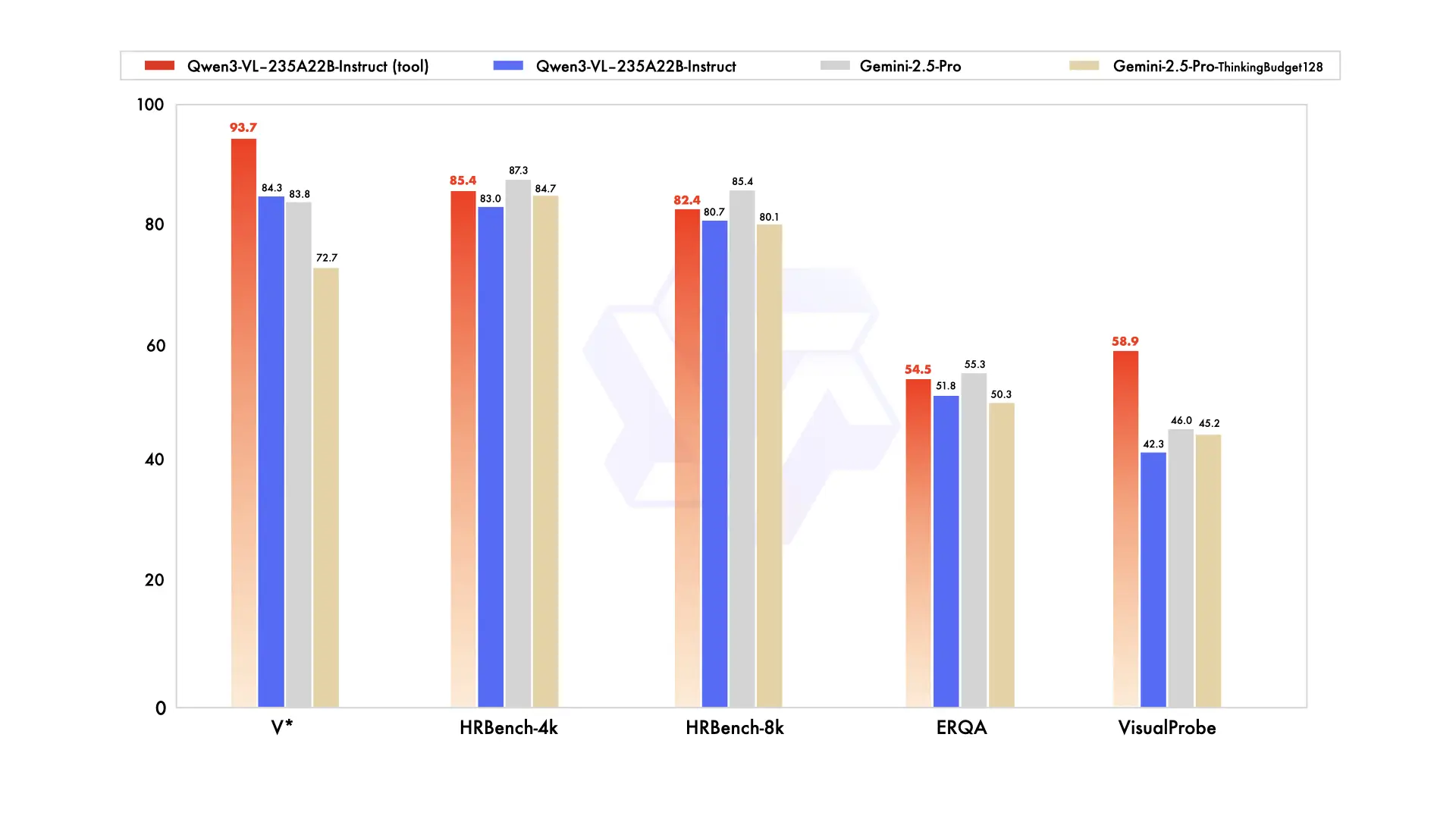
Thinking variants generate explicit reasoning in <think> blocks before giving their answer. On math and STEM tasks, this improves accuracy by 15-25% over Instruct. The 8B-Thinking, for instance, jumps from ~65 to 79-80 on MathVista just by reasoning out loud. For the 32B, MMMU goes from 76.0 (Instruct) to 78.1 (Thinking).
But here's the caveat the benchmarks don't tell you.
Community testing by Dubesor's LLM Benchmark found that Instruct actually outperforms Thinking on most general vision tasks — image captioning, basic document reading, simple visual QA. The reasoning overhead slows things down (Instruct is roughly 1.5-2x faster) and doesn't always help when the task is straightforward. Thinking mode shines on problems that genuinely require multi-step reasoning: reading a chart, solving a geometry problem in a photo, parsing a complex multi-page form.
| Task Type | Winner | Why |
|---|---|---|
| Math from images (AIME, GPQA) | Thinking | 15-25% accuracy boost from explicit reasoning |
| STEM diagram analysis | Thinking | Step-by-step breakdown catches details |
| Complex OCR + table parsing | Thinking | Reasons about layout ambiguities |
| Image captioning | Instruct | Faster, reasoning overhead adds no value |
| Simple document QA | Instruct | Direct answers are better for simple questions |
| Batch processing / production | Instruct | 1.5-2x speed advantage, lower cost |
| GUI automation / agents | Instruct | Faster response loop for agentic workflows |
Our recommendation: default to Instruct for production workloads, switch to Thinking when accuracy on hard STEM/math problems justifies the speed cost. Both variants share the same weights for non-reasoning tasks, so the quality gap on simple work is minimal.
Benchmarks That Matter
We're focusing on benchmarks that reflect real-world usefulness, not synthetic leaderboard scores. All numbers below come from Qwen's official evaluations unless noted otherwise.
Flagship: 235B-A22B Thinking
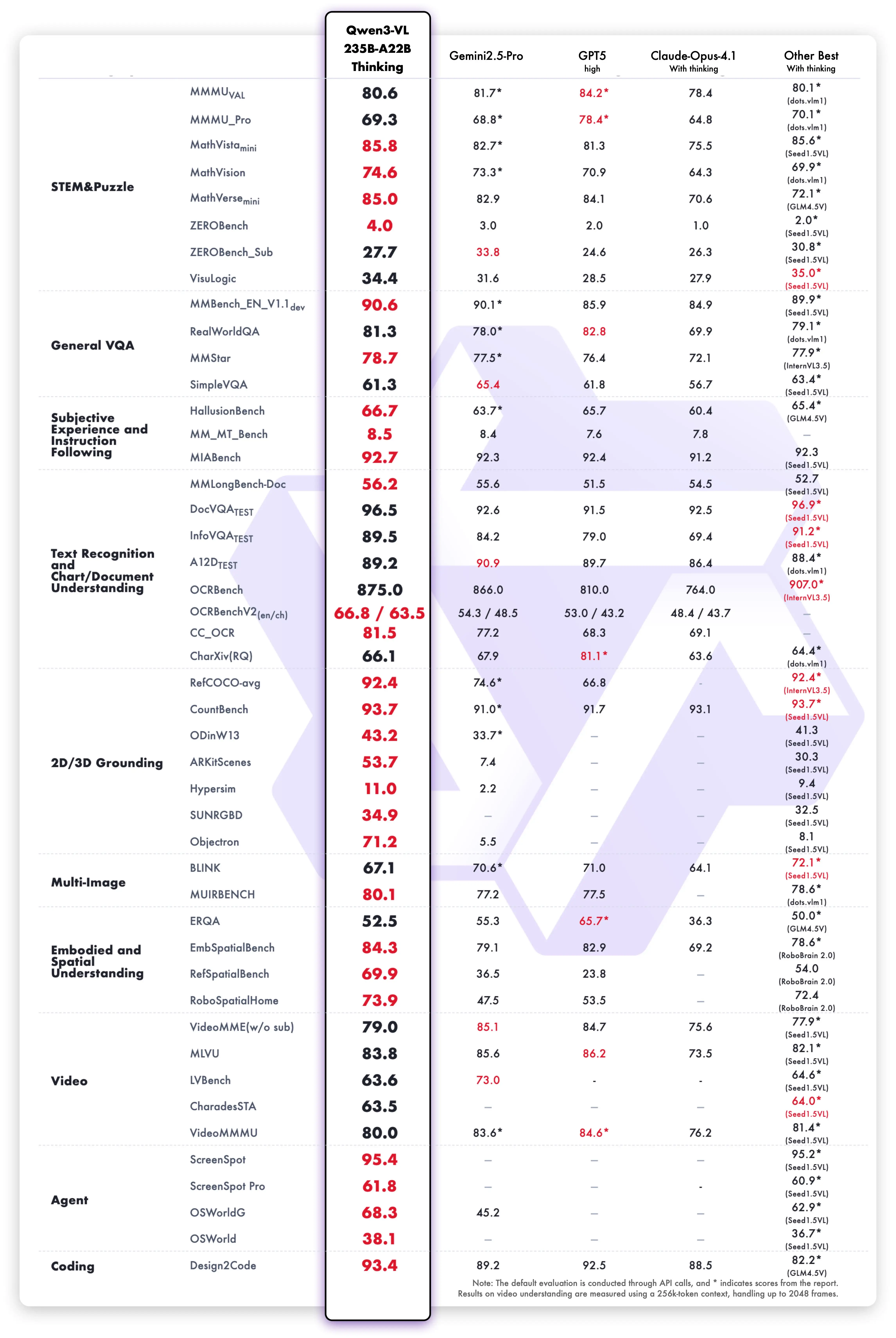
The headline result: MathVision 74.6, beating Gemini 2.5 Pro (73.3) and GPT-5 (65.8). On MathVista, it scores 85.8 vs GPT-5's 81.3. MMMU lands around 80.1, and OCRBench hits 875 across 39 languages — the highest score we've seen from any open model on multilingual OCR.
ScreenSpot Pro — the benchmark for GUI element detection — comes in at 61.8. That's solid but not dominant. Closed-source models with more specialized training data still hold advantages on some agentic tasks. This is one area where Qwen3-VL is good but not yet best-in-class.
The Smaller Models Punch Hard
The 32B dense model scores MMMU 78.1 (Thinking) — within two points of the 235B flagship. OCRBench 875, identical to the flagship. For document-heavy production work, the 32B gives you 95% of flagship accuracy on a single 24GB GPU.
The 8B is where things get surprising. MathVista Thinking hits 79-80, which is higher than GPT-4o's 64 on the same benchmark. MMMU-Pro comes in at 56.6 — respectable for an 8B model, though it can't match larger models on the hardest multimodal reasoning tasks.
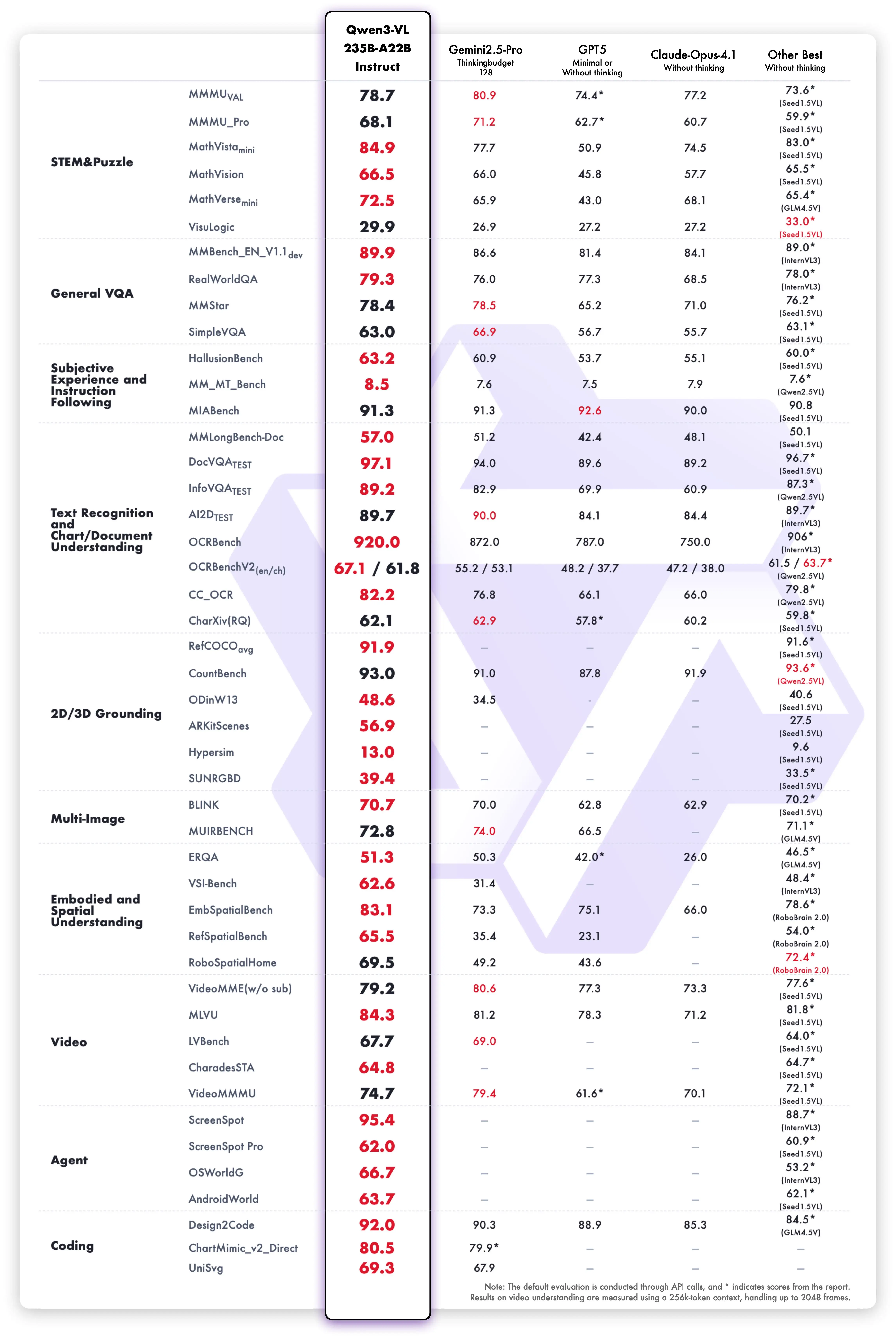
The 30B-A3B MoE reaches MMMU 74.2 on Instruct, despite only activating 3B parameters. That's remarkably efficient — you're getting 74% MMMU accuracy at a compute cost closer to a 4B model.
Capabilities Showcase
Rather than listing features abstractly, here's what Qwen3-VL actually does — with demos straight from the Qwen team's testing. These aren't cherry-picked marketing shots; they represent the model's core competencies.
Sketch-to-Code
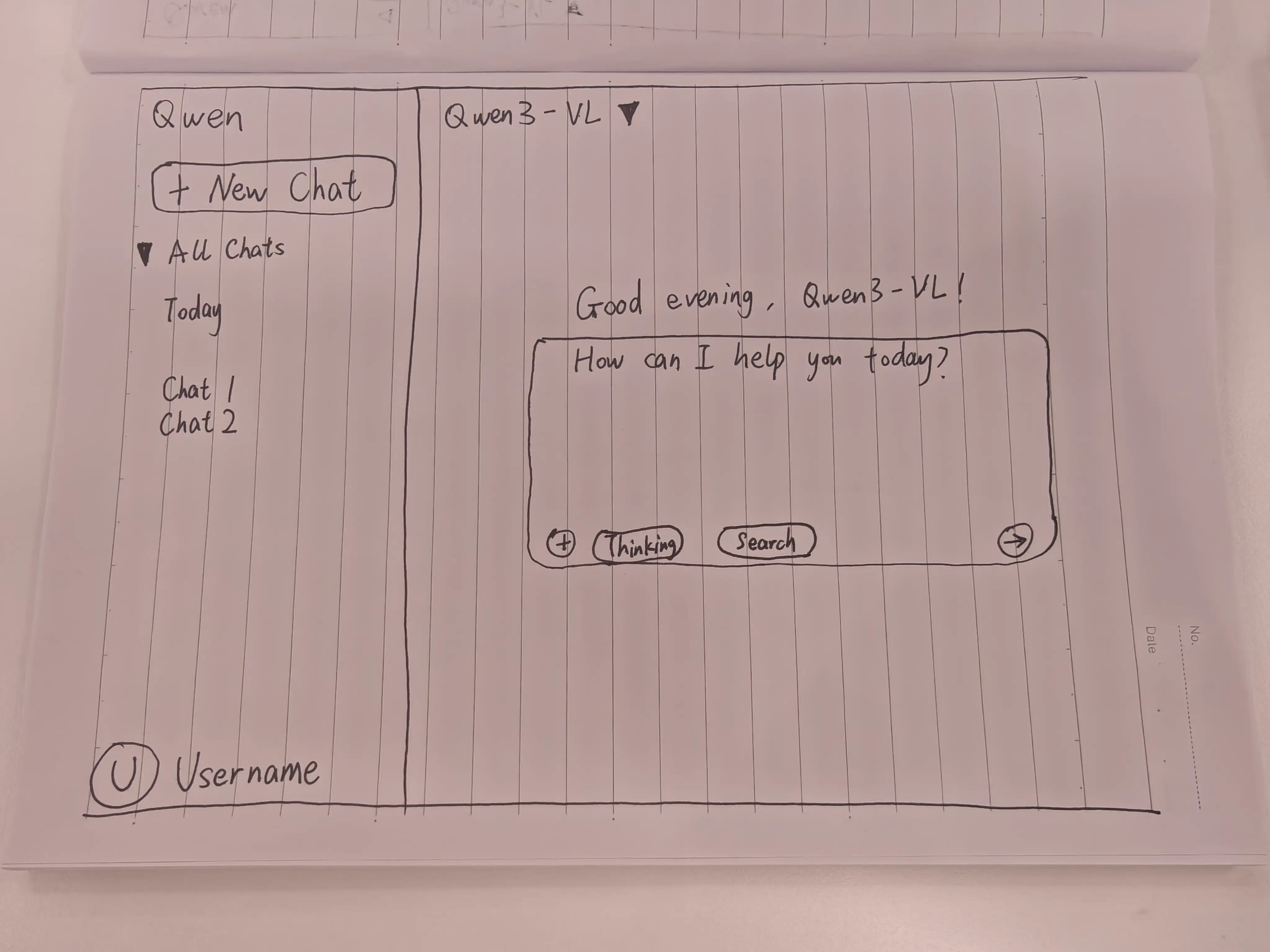
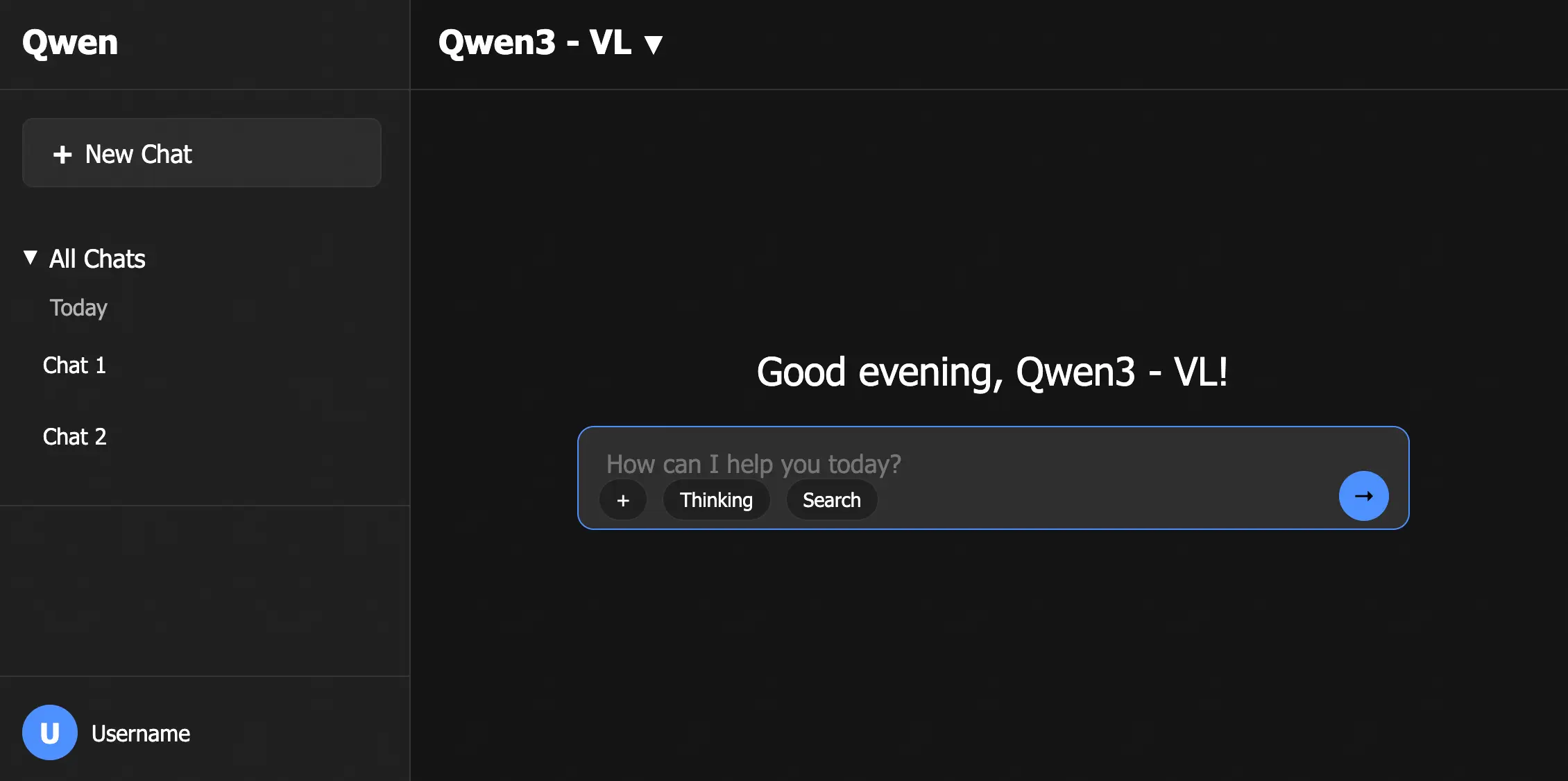
Hand-draw a UI wireframe on paper, take a photo, and Qwen3-VL generates the HTML/CSS/JavaScript to build it. This capability improved significantly with the January 2026 Flash update, and community tests show it producing usable layouts from fairly rough sketches.
It's not pixel-perfect — you'll need to adjust spacing, fonts, and responsive breakpoints. But as a prototyping tool, it collapses the wireframe-to-code pipeline from hours to minutes. Designers can sketch on a whiteboard, snap a photo, and have a working starting point before the meeting ends. The Qwen Coder models handle text-to-code better for pure programming tasks, but for visual-to-code translation, the VL models are the right tool.
STEM Reasoning
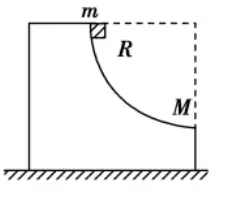
Point Qwen3-VL at a textbook diagram, a chart, or a whiteboard equation, and the Thinking variant works through the problem step by step. This is where the 8B-Thinking's MathVista score of 79-80 becomes tangible — it reads the visual, extracts the numbers, and reasons about them like a tutor explaining their work.
Visual Grounding
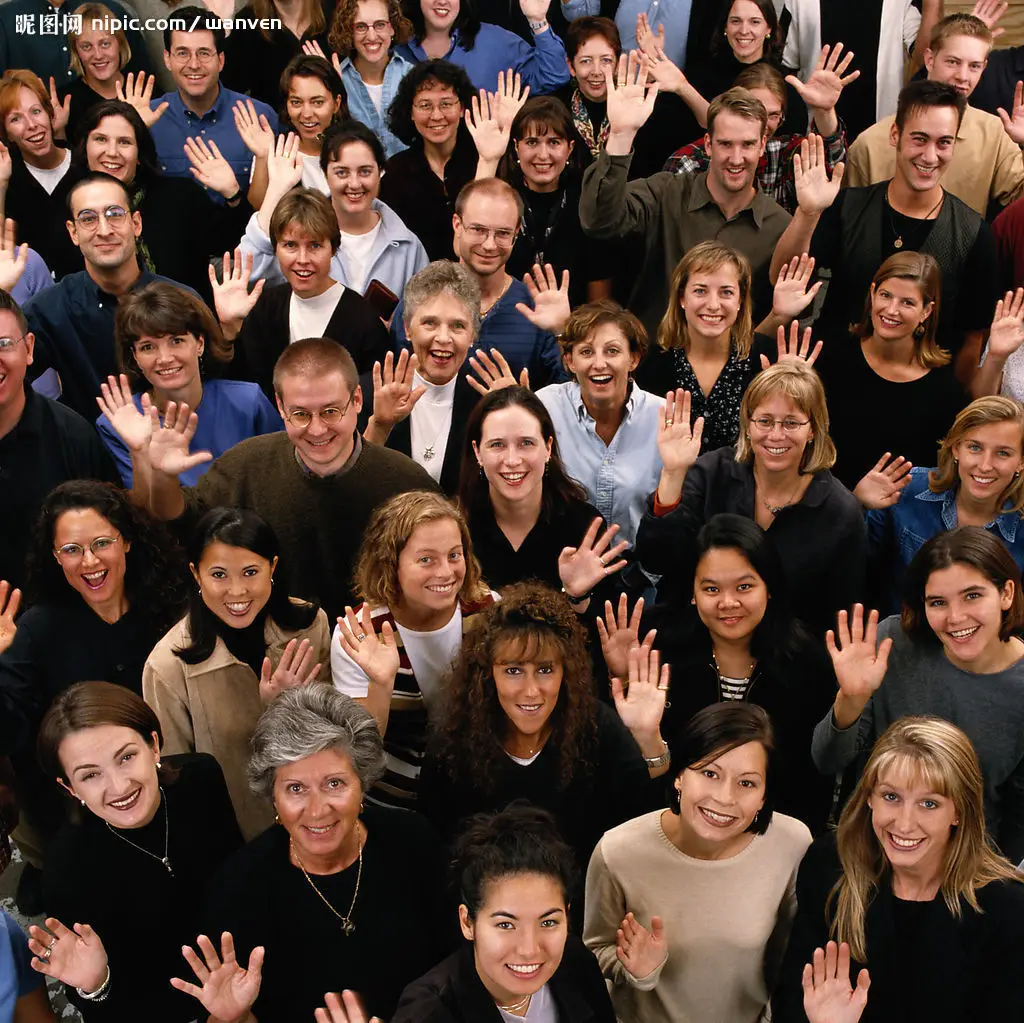
Ask "highlight all the cars" or "find every price tag" and Qwen3-VL returns JSON with pixel-level bounding box coordinates. The output format includes normalized coordinates that work at any display resolution, making it straightforward to integrate into applications.
This powers real workflows: inventory counting from warehouse photos, quality inspection on manufacturing lines where defects need bounding boxes, and accessibility tools that describe specific image regions to visually impaired users. The grounding works across the full resolution of input images, not just on downscaled thumbnails — a meaningful improvement over earlier VLMs that would lose spatial precision on high-res inputs.
Multilingual OCR (32 Languages)
One of the biggest jumps from Qwen2.5-VL (which handled roughly 10 languages). Qwen3-VL reads text in 32 languages from natural scenes, handwritten notes, printed documents, and screenshots. The OCRBench score of 875 across 39 language scripts is the highest we've tracked for any open model. For document processing pipelines that handle multilingual content, this alone could justify the upgrade.
2-Hour Video Understanding
Previous VLMs typically choked on videos longer than a few minutes. Qwen3-VL processes up to 2 hours of video with second-level temporal tagging — you can ask "at what timestamp does the speaker show the chart?" and get a precise answer. The model uses a Text-Timestamp Alignment technique that maps visual events to specific time codes, making it genuinely useful for video surveillance, lecture analysis, and content moderation workflows.
Visual Agents (GUI Operation)
Treat any screenshot as an interactive canvas. Tell Qwen3-VL "click the Settings button" and it returns the exact pixel coordinates. This enables agentic UI automation — the model navigates desktop apps and mobile interfaces by reading screenshots and issuing click/type actions.
The Android-Control benchmark score of 95.2% on the 235B flagship shows this isn't just a demo feature; it's production-grade. Companies building RPA (robotic process automation) pipelines can use Qwen3-VL as the "eyes" of their agent, replacing fragile CSS selectors with visual understanding that adapts when UI layouts change. The smaller models work for this too — the 8B handles basic GUI navigation well enough for many automation scripts, especially when the UI is clean and well-labeled.
Qwen3-VL vs Qwen2.5-VL — What Changed
If you're running Qwen2.5-VL in production and wondering whether to upgrade, here's the full comparison. Short answer: the jump is substantial.
| Feature | Qwen2.5-VL | Qwen3-VL | Impact |
|---|---|---|---|
| Model sizes | 4 (3B, 7B, 32B, 72B) | 6 (2B-235B) + MoE | More deployment options at every scale |
| Architecture | Dense only | Dense + MoE | MoE gives better quality/compute ratio |
| Context window | 128K | 256K (1M expandable) | 2x base context, 8x with extension |
| Thinking mode | No | Yes (all sizes) | 15-25% boost on STEM/math tasks |
| OCR languages | ~10 | 32 | 3x language coverage |
| Video capability | Basic | 2-hour, second-level timestamps | Real video analysis, not just short clips |
| Visual agents | Limited | Computer + mobile operation | Full GUI automation capability |
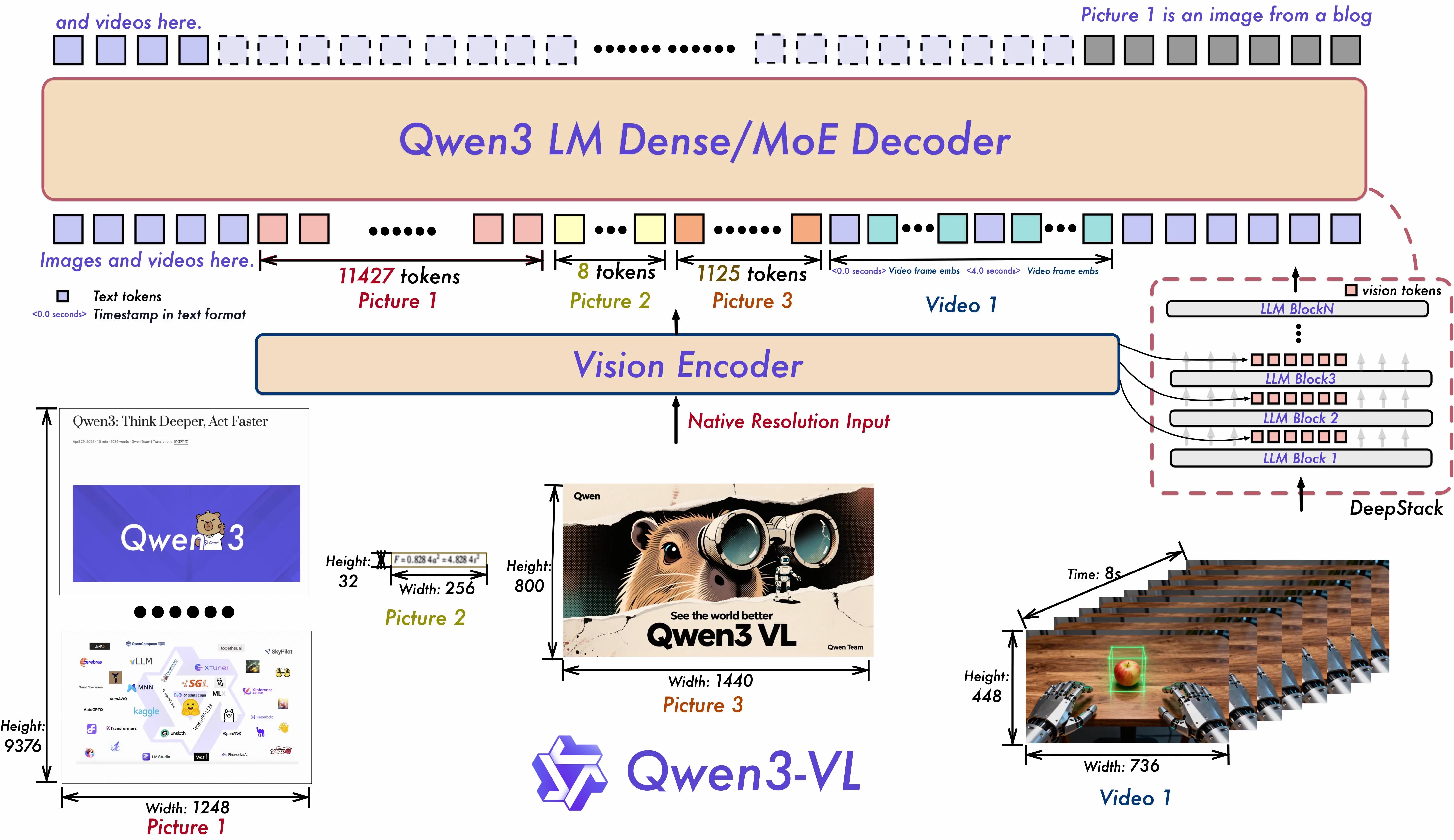
| DeepStack | No | Yes (multi-level ViT fusion) | Better detail preservation in images |
The architectural leap matters. Qwen3-VL uses a SigLIP-2 based vision encoder with DeepStack — a technique that fuses visual features from multiple levels of the vision transformer into the early layers of the language model. In practical terms, this means the model doesn't just "see a thumbnail" of your image. It preserves fine-grained details that previous architectures would lose, which is why OCR accuracy jumped so dramatically.
Bottom line: if you're on Qwen2.5-VL, the upgrade path is clear. The 8B replaces the old 7B with better scores across every benchmark. The 32B replaces the old 72B while needing far less VRAM — 24GB instead of 48GB+ for comparable quality. And you gain Thinking mode, MoE options, and triple the OCR language support for free.
One honest caveat on the upgrade: Qwen3-VL is slower per image than Qwen2.5-VL on equivalent hardware. The richer vision encoder (DeepStack, SigLIP-2) processes more detail but takes more compute. If your pipeline is latency-sensitive and you're happy with Qwen2.5-VL accuracy, the speed trade-off is worth considering. For everything else, Qwen3-VL is the better choice.
Run Locally (Ollama, llama.cpp, Transformers)
All six models have GGUF quantizations available. Here's what you need by model size:
VRAM Requirements (32B as Reference)
| Quantization | File Size | Min VRAM |
|---|---|---|
| Q4_K_M | 19.8 GB | ~22 GB |
| Q8_0 | 34.8 GB | ~38 GB |
| F16 | 65.5 GB | ~68 GB |
GPU Recommendations by Model
| Your VRAM | Recommended Model | Quantization |
|---|---|---|
| 6-8 GB | 2B | Q8_0 or FP16 |
| 8-12 GB | 4B or 8B | Q4_K_M |
| 16 GB | 8B | Q8_0 |
| 24 GB | 32B | Q4_K_M |
| 48 GB+ | 32B | Q8_0 or FP16 |
| Multi-GPU | 235B-A22B | FP8 or Q4 |
Not sure what your GPU can handle? Our Can I Run Qwen tool checks your specific hardware against every model and quantization.
Ollama (Fastest Setup)
# One command, that's it
ollama run qwen3-vl:8b

# Other sizes available
ollama run qwen3-vl:2b
ollama run qwen3-vl:4b
ollama run qwen3-vl:32b
Important caveat: Ollama supports images but not video for Qwen3-VL yet. If you need video processing locally, use vLLM or the Transformers pipeline instead.
llama.cpp
# Using llama-mtmd-cli with the multimodal projector
llama-mtmd-cli -m qwen3-vl-8b-instruct-q4_k_m.gguf \
  --mmproj qwen3-vl-8b-mmproj-f16.gguf \
  --image photo.jpg \
  -p "Describe what you see in detail"
Transformers (Python)
pip install transformers qwen-vl-utils accelerate

from transformers import AutoModelForVision2Seq, AutoProcessor

model = AutoModelForVision2Seq.from_pretrained(
    "Qwen/Qwen3-VL-8B-Instruct",
    torch_dtype="auto",
    device_map="auto"
)
processor = AutoProcessor.from_pretrained("Qwen/Qwen3-VL-8B-Instruct")
For production serving with high throughput, the Qwen API offers Qwen3-VL-Plus and Qwen3-VL-Flash via DashScope with OpenAI-compatible endpoints. The Flash model got a January 2026 update with improved visual recognition.
Known Issues and Caveats
No model family is without rough edges. Here's what you should know before committing to Qwen3-VL in production:
VRAM leak over long sessions. Users running Qwen3-VL through vLLM have reported gradually increasing memory usage during extended inference sessions. This is tracked in vLLM issue #28230. If you're building a long-running service, implement periodic restarts or monitor memory usage closely.
Slower inference than Qwen2.5-VL. The improved vision encoder (SigLIP-2 + DeepStack) processes more visual detail, but that comes with a speed cost. Expect Qwen3-VL to be noticeably slower than the previous generation on equivalent hardware, especially for high-resolution images. The MoE variants partially offset this — the 30B-A3B is considerably faster than the 32B dense at similar quality levels.
30B-A3B benchmark reproducibility. Some community members have struggled to reproduce the official benchmark numbers for the 30B-A3B model, as discussed in GitHub issue #1617. The discrepancies aren't massive, but they're worth noting if you're making deployment decisions based on specific benchmark targets.
Ollama: no video. As mentioned above, Ollama's Qwen3-VL integration handles images only. Video support requires vLLM, SGLang, or the Transformers library. This is an Ollama limitation, not a model limitation.
No audio processing. Qwen3-VL is vision + text only. For audio + video understanding, you need Qwen3-Omni. For speech-to-text, Qwen3-ASR is the dedicated tool.
From the Community
Here's what developers and researchers are saying about Qwen3-VL:
Simon Willison called the Qwen3-VL family "a significant step forward" for open vision models, noting that the flagship matches or exceeds Gemini 2.5 Pro on several benchmarks. He highlighted the visual grounding and long-video capabilities as areas where Qwen3-VL sets a new bar for open-source.
On r/LocalLLaMA, the 8B model has become a community favorite. Users consistently describe it as the best vision model at its size class, with one popular thread calling it "not just OCR with extra steps — the model reasons about what it sees." Multiple users report running the 8B at Q4 on 12GB GPUs with no issues, processing invoices and receipts faster than they expected from a model this small.
Nathan Lambert framed the broader Qwen 3 ecosystem as "the new open standard," and the VL models are a big part of that perception. The Decoder ran a dedicated piece on the 2-hour video understanding capability, calling it a "practical breakthrough" for surveillance and media workflows.
The 32B has earned praise in community testing for consistent quality across diverse vision tasks, with FP8 quantization performing nearly identically to full BF16 — good news for users trying to fit it into limited VRAM. StarkInsider's testing found that "Qwen is taking over LocalLlama" in adoption, particularly for vision tasks where the open-source alternatives were historically weak.
FAQ
8B or 32B — which should I run?
The 8B is surprisingly close to the 32B on many tasks. For general image understanding and simple document QA, the 8B is enough and runs on much cheaper hardware. Switch to the 32B for OCR-heavy workflows where accuracy on every character matters, or for complex multi-page document analysis where the extra parameters pay for themselves.
Thinking or Instruct?
Instruct for general vision work. It's faster and, counterintuitively, often more accurate on straightforward tasks. Thinking for STEM, math, and complex reasoning where showing the work improves the answer. If you're not sure, start with Instruct and switch to Thinking only when you see accuracy issues on hard problems.
Can I run Qwen3-VL vision locally?
Yes. The 8B in Q4 quantization fits in 8GB VRAM. The 2B runs on even less. Use ollama run qwen3-vl:8b for the fastest setup, or check our hardware compatibility tool for specific GPU recommendations.
Qwen3-VL or Qwen 3.5 for vision tasks?
Different tools. Qwen 3.5 is a unified multimodal model — text, vision, and reasoning in one package, with a massive context window. Qwen3-VL is the dedicated vision specialist: more size options (including tiny edge models), Thinking mode for visual reasoning, VL-Embedding for multimodal search, and specialized training on vision-heavy tasks. If vision is your primary use case and you want to pick the exact right model size, Qwen3-VL. If you need one model that does everything, Qwen 3.5.
Does Qwen3-VL handle video with audio?
No — it processes visual frames only. For combined audio + video understanding, use Qwen3-Omni. For audio/speech alone, Qwen3-ASR.
How does Qwen3-VL relate to the older Qwen2.5-VL?
Qwen3-VL is a full generational upgrade. More sizes, MoE architecture, Thinking variants, 3x the OCR languages, 2x the context window, and DeepStack vision encoding. Qwen2.5-VL still works, but there's no reason to start new projects on it. See the detailed comparison table above.